Designer Decals Decorate with Inkjet Decal Paper

Simon Elmore reveals a cheap way to produce you own decals.

Published by Model Collector™ Magazine February, 2002

Designer Decals Decorate with decals


Before the introduction of printing to die-cast toys and models, the signs, emblems and adverts more often than not took the form of decals or waterslide transfers.

When restoring a die-cast model to its former glory, surely one must be as accurate as possible; so if the original model had decals then the restoration, if possible should also.

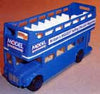
The reproduction decals on offer from model suppliers such as Steve Flowers are excellent and well priced, but for those who have an artistic streak it is remarkably easy to reproduce your own replacements. Alternatively, you can create your own individual model, like my MODEL COLLECTOR Routemaster pictured above.

water slide decals

1. A Blank Canvas

I am adding decals to an old Corgi open top bus that I found in my dad's strange collection. I have no idea why it was 'sans decals' but it was and just meant I had a blank canvas to work with!

There are many suppliers of decal paper designed to work with a standard home inkjet printer. For information on acquiring some of this paper see the details at the end of this article. All paper used here was kindly provided by Mcgonigal Paper and Graphics.

Two types of paper are available, clear and white. Clear decal paper leaves all uncoloured areas transparent. This paper is excellent, although it cannot produce designs with white in the colour scheme. However, there is also a white decal paper that leaves all uncoloured areas white. For this step-by-step I will be using the white decal paper, as I require a white background for some of my designs.


2. Test sheets and printouts

As with the labels produced in the first part of this article it is paramount that the size of the decals is worked out precisely before they are applied. Firstly, design the decals in any presentation or art package (as shown in the January 2002 issue of MODEL COLLECTOR) and print out test sheets that can be cut out and checked against the model.

My test sheet was made up of the MODEL COLLECTOR logo already used on the Model A van and a long banner for the side of the bus stating the obvious:Britain's BIGGEST Selling Diecast Magazine'!

The banner was a simple dark blue-bordered rectangle surrounding a Lucida Casual text with a slight shadow. The designs were produced in various sizes and printed out on an A4 test sheet. When sizes were finalized we printed the designs onto the white decal paper, making sure we set all print options to print at best quality. Then the decals were left to dry for about ten minutes and cut into more manageable sheets with a couple of extra designs printed out just in case!


water slide decals

3. Spraying and cutting

Produce a vanish-like layer that will stick to the design and act as a carrier film for the ink.
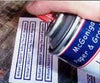
The spray I used came with the decal papers from McGonigal as part of a DIY Decals set.

It is important when spraying the decals that you create a balanced, thin and thorough coating to the surface.

Short sprays an a steady hand best produce this cover with the can held 8 inches away from the paper and moving in a slow side-to-side motion. Make sure that the room where you spray is very well ventilated and try not to get any of the spray on your hands. When all relevant decals have been covered, leave them to dry for 10 hours or as paper decal paper instructions.

For best results keep the decals at room temperature.

Our kit suggested a drying time of between 2 and 12 hours but use your own judgment.

Basically the decals will not suffer by being left to dry for too long, better to be safe than sorry!


water slide decals

4. Knives and Tweezers

When the decals have completely dried they can be cut, soaked and COLLECTOR emblems and side banners. The best way of cutting them out is to use an artist's scalpel or knife, metal rule and cutting board.

This method, if your knife is sharp, should produce a much straighter cut than scissors and there should be minimum finger- printing! With the benefit of hindsight, the knack of cutting these decals is to not leave any outline to the decal at all, an unwanted outline may distort the overall appearance and give an effect that looks a bit like the white border bleeding into the colour.

The cut decals must then be soaked to allow separation of the carrier film and backing. Before soaking starts make sure that you have the model, some tissue and an old, soft paintbrush handy, ready for the application.

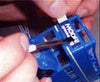
The decals need to be fully immersed in a bowl of slightly warm water. It is my opinion that using tweezers eliminates the struggle of removing the decal from the water and thus helps to eliminate any separation before final application.

Depending on the paper you use, the soaking should only last a matter of seconds. My decals needed to be soaked for approximately 15 to 20 seconds. A good way to check if the decal is ready for application is to simply remove the decal after the allotted time and very gently rub between your fingers to see if backing and film.


water slide decals

5. Application

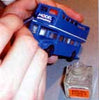
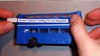
When the decal is ready, quickly yet carefully transfer it to the model. (My first decal was for the front of the bus, as shown.) On application it is important to keep the decal relatively wet so that it can be moved

Use a slightly damp, soft, old paintbrush, this will work as a moisturizer and will help to move the decal into position. With the damp paintbrush in hand, gently pry the backing away from the carrier film.


water slip decal coating

6. Decal Coat

Once the decal is in a satisfactory position, lightly dab it with a small piece of tissue- This will help the decal to dry. Leave the positioned decal for a couple of minutes to allow the adhesion to become secure, and then apply a layer of Decal Coat which is a solution that improves adhesion between the decal and the surface, it also helps eliminate the decal shine and improve any visible decal outline.

The Coat should be applied all over the decal in a thin layer, continuing the application to about 1 mm past each edge, thus providing a 'Coat border'. This application process can be repeated for as many decals as your model requires.

Designer Decals Decorate with decals

A Brief Aside

My MODEL COLLECTOR bus has a smaller emblem on the back and one on each of the sides, along with an advertising banner. These are applied in just the same way and fixed in position using Decal Coat as well.


Results and warnings!

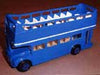
As you can see from the final shots the decals work quite well against the light blue backdrop of the bus. However, on close inspection there is an apparent white border on each decal that seems to bleed into the blue decal.

This would not happen if I had used the clear decal paper, although I could not, of course, have produced the striking white backgrounds of the side banners.

The reason for the bleeding effect is that, however close I thought I had got to the precise cut of the decal, I must have left a minuscule white border in places.

The paper and spray film are good enough to not allow any actual bleeding of colour, but the decals do seem to give this effect visually. The way round this. I believe, is if white decal paper must be used, simply print out the background colour of the decal design far larger than needed.

If I had had a larger area of the blue surround, then I would have to cut through blue on all sides and would not have been able to leave that annoying white border!

This again emphasizes how the restoration of models is in no way an exact science, one must try, and fail sometimes, in order to learn! Now go design those decals!

Designer Decals Decorate with decals


Decal Kits: Inkjet Water Slide Decals -  Pro Kits
Decal Kits: Inkjet Water Slide Decals - Pro Kits


Availability: Usually ships in 3-4 business days.

Decal Kits: Inkjet Water Slide Decals - Pro Kits
MCD-12$44.76, 2 Pro Kits $85.04, 5 Pro Kits $201.42
Pro Kit Selection: 

SecurityMetrics Credit Card Safe McGonigal Paper & Graphics LLC Click to verify BBB accreditation and to see a BBB report. HACKER SAFE certified sites prevent over 99.9% of hacker crime.

McGonigal Paper & Graphics LLC
offers a unique selection of papers for art & crafts and graphic design.
Our papers are designed for professional, personal, scrapbooking & hobby creativity.

Product Index | Customer Service | Privacy Policy | Home | Specials | New Products

Shipping Charges: U.S. Orders Contiguous 48 States: Only $6.95
Orders Over $125.00 - Free Shipping

This Web site is intended only for use by U.S. residents.

Office Hours: 9 AM - 4 PM Eastern Time Monday through Friday - Phone / Fax: 215 679-8163
Address: School House Lane, Zionsville, PA 18092-2644

Download Mail / Fax Order Form
Adobe PDF 5.0 or greater to download the Mail / Fax Order Form

McGonigal Paper & Graphics LLC ecommerce provided by Yahoo! Small Business

www.mcgpaper.com

Get Our Newletter


Address for this web site is: mcgpaper.com Copyright© 1999-2008
sitemap.xml | objinfo.xml